How to Build a Web Application in 2025

How to Build a Web Application in 2025

25 Mar 2025

In our digital world, web apps are key players across many fields, from online shopping to money matters and learning. As tech moves forward web application development in 2025 needs smart planning up-to-date tools, and top-notch coding methods. This how-to will show you the steps to build a web app that hits the mark. 

What is a web app? 

A web application is a computer program that operates on a web server and people access it through their web browsers. Unlike software you install on your computer, web apps don't need to be downloaded and you can use them on different devices. Some well-known examples are Gmail, Trello, and Netflix. 

How to make a web app   

Define Your Goals and Requirements 

Before you start building, spell out why you want this web application. Ask yourself: 

  • What issue does the app fix? 
  • Who will use it? 
  • Which features do you need? 
  • What steps will you take to keep it safe? 

Making a clear plan for your project will help you stay on track with what your business wants. 

Choose the Right Tech Stack 

Selecting the right tech stack is crucial for the success of your web application. Moving towards 2025, the recommended tech stack is to select the following recommendations in each layer of your application:  

  • Front end: React, Vue.js, or Svelte will suit you well for building interactive user interfaces. 
  • Back end:  use Node.js, Django, or Ruby on Rails for executing your server-side logic (depending on which programming language you wish to use like Javascript, Python, or Ruby).
  • Database: you could use PostgreSQL, MongoDB, or Firebase (in order on recommendation as relational structure). For hosting, AWS, Vercel, or DigitalOcean can work well for hosting your application (depending on how much you want to spend).
  • Security: there are HTTPS, OAuth, and two-factor authentication for securing users. 

Focus on UI/UX Design 

User experience (UX) and user interface (UI) design are crucial for engagement and usability. Follow these best practices: 

  • Use responsive design to ensure compatibility with all devices.
  • Implement intuitive navigation and clear call-to-actions.
  • Maintain consistency in fonts, colors, and elements.
  • Conduct user testing to refine usability. 

Web App development 

Once you have a solid plan, start building your application: 

  • Frontend Development: Convert UI designs into code using HTML, CSS, and JavaScript frameworks.
  • Backend Development: Develop APIs, authentication systems, and database management.
  • Integrations: Implement third-party services such as payment gateways and analytics tools. 

Test and Debug Thoroughly 

Testing ensures a smooth user experience and reduces potential issues. Utilize: 

  • Unit Testing: Test individual components.
  • Integration Testing: Ensure different modules work together.
  • User Testing: Gather feedback from real users to identify usability issues.
  • Performance Testing: Optimize loading speeds and responsiveness. 

Deploy and Monitor the Application 

Once the application is ready, deploy it to a reliable hosting provider. After deployment, continuously monitor performance and security: 

  • Use DevOps tools like Docker and Kubernetes for smooth deployment.
  • Implement logging and error-tracking tools like Sentry.
  • Regularly update your app to patch security vulnerabilities. 
Benefits of web app   
  • Cross-Platform Compatibility
  • No Installation Required
  • Automatic Updates
  • Scalability & Maintenance
  • Security
  • Cost-Effective
  • Improved User Engagement 

Conclusion 

Building a web application in 2025 requires a strategic approach, modern technologies, and a focus on user experience. By following these steps-defining goals, selecting the right stack, designing intuitively, developing efficiently, testing thoroughly, and deploying securely-you can create a robust and scalable web application. 

If you're looking for an efficient way to build and deploy websites, Trawlii is an excellent choice. It provides a user-friendly platform with powerful tools for website creation, hosting, and management, making it easier to bring your web application to life. Stay updated with the latest tech trends and continuously improve your application to meet user demands. 
Explore More Blogs

blog-image

Healthcare Appointment Scheduling Software Development

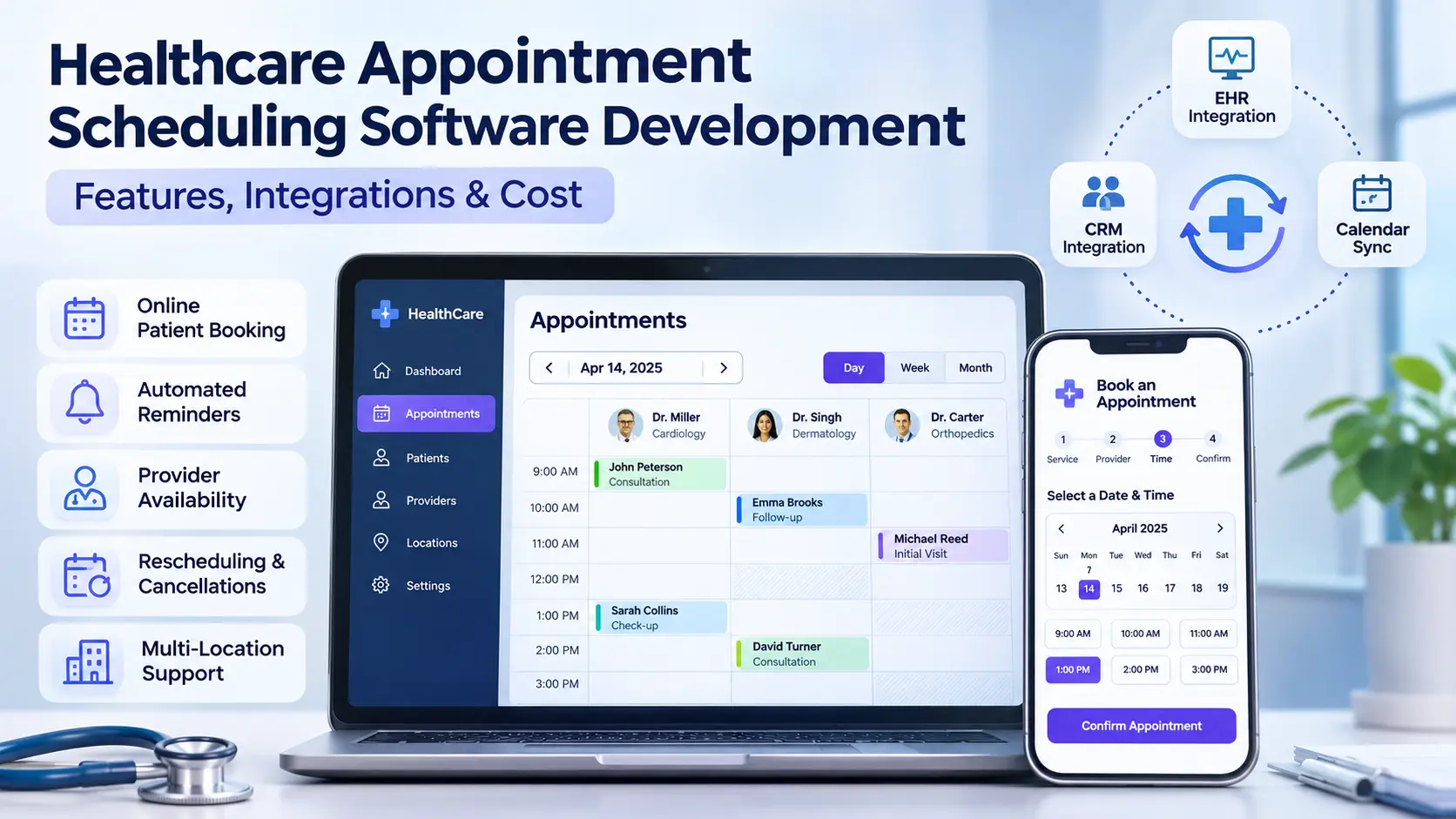
A patient goes to the clinic website at 9 PM, books an appointment for the next day and the confirmation appears on the screen. Patient thinks all is sorted. But the clinic schedule tells a completely different story. The doctor is not available at that time, the booking hasn't made it onto the staff calendar, or the request is still awaiting confirmation. The patient turns up thinking they have an appointment, the front desk have nothing at all. This is one example of why healthcare appointment booking isn't just about having an online booking calendar. Medical practice scheduling needs to take into account provider availability, appointment type, clinic opening and closing times, patient information and the communication flow. If all of these are disconnected, then the staff end up with far more time spent correcting appointments and the patient can end up with all sorts of confusing information. Custom healthcare appointment scheduling software can be used to manage those workflows in a single integrated system. In this guide we look at the key features, the integrations you'll need, the development process, the security considerations and the various factors that will impact the cost of building a healthcare scheduling application.

blog-image

Travel Booking Software Development: Features, Architecture, Cost & Roadmap

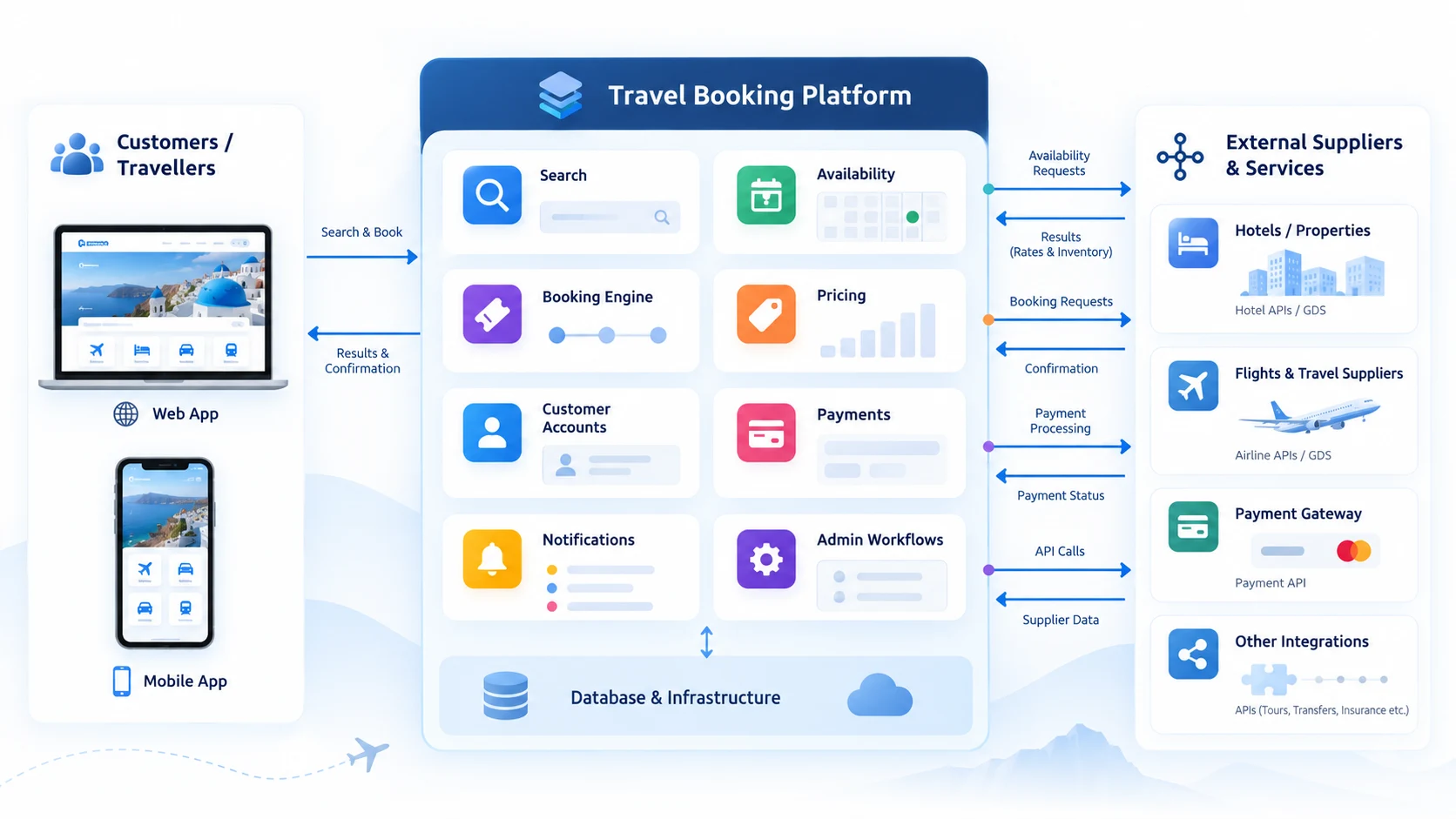
If you look at a travel booking website, it appears to be straightforward – you click to search, select a travel package, make a payment, and get a confirmation. In the background of that trip lies a much more challenging software issue. A production travel platform may need to integrate live inventory, pricing, availability, customer accounts, payments, cancellations, supplier integrations, notifications, and administrative workflows—and ensure that the traveller does not feel these layers of complexity. This is why it is necessary to begin with architecture and operations when developing travel booking software successfully, instead of screens. The first question that any hotel chain, tour operator, OTA, or travel-tech startup should ask is not “Which framework shall we use?” It should be: “What booking process should we have in our own system, and what parts should be externalized?”

blog-image

How Much Does Custom Software Development Cost in 2026? (The SME Guide)

If you are setting a software development budget in 2026, you have probably already seen quotes that differ by six figures for what looks like the same product. That gap is not random. Scope, technology choices, team location, engagement model, and what gets quietly left out of the first proposal all move the number — often more than feature lists alone would suggest. Cost transparency matters because opaque estimates create the wrong kind of risk. You either over-allocate capital you could use elsewhere, or you approve a lowball figure that collapses once QA, licences, cloud, and change requests appear. Neither outcome helps a CTO, IT Director, or founder who needs a ship date and a board-ready number. This SME guide explains custom software development cost 2026 in practical terms: what drives the price, realistic ranges by project type, hidden costs buyers routinely miss, how to get a software development cost estimate you can plan against, and why many growing organisations look to India-based teams without giving up quality. By the end, you will know how to brief a partner and judge whether a quote is honest — or incomplete. Quick reference — typical project ranges (USD, mid-complexity, blended offshore/nearshore delivery): Project type Typical 2026 range (USD) MVP / prototype $15,000 – $50,000 Web application / customer portal $40,000 – $150,000 Cross-platform mobile (iOS & Android) $50,000 – $180,000 Enterprise platform / ERP / CRM $150,000 – $500,000+ Pure onshore delivery in the USA or Germany usually sits higher on the same scope. Use the table as a planning band, not a fixed quote.

Get In Touch

Whether you're looking to build a custom digital product, revamp your existing platform, or need expert IT consulting or you need support, our team is here to help.

Contact Information

Have a project in mind or just exploring your options? Let's talk!

email contact@trawlii.com

up-icon