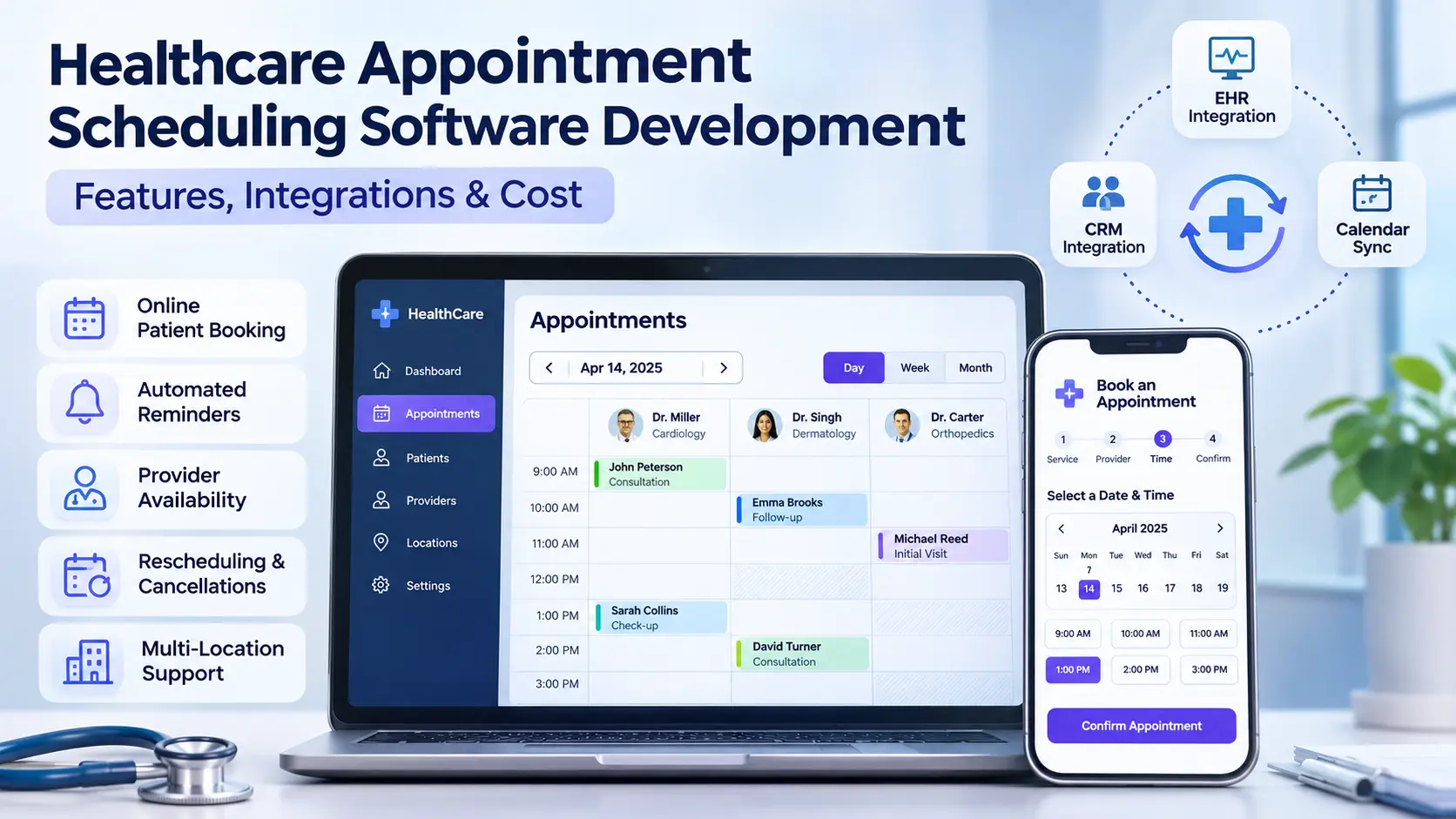
Healthcare Appointment Scheduling Software Development
19 Nov 2026A patient goes to the clinic website at 9 PM, books an appointment for the next day and the confirmation appears on the screen. Patient thinks all is sorted.
But the clinic schedule tells a completely different story.
The doctor is not available at that time, the booking hasn't made it onto the staff calendar, or the request is still awaiting confirmation. The patient turns up thinking they have an appointment, the front desk have nothing at all.
This is one example of why healthcare appointment booking isn't just about having an online booking calendar.
Medical practice scheduling needs to take into account provider availability, appointment type, clinic opening and closing times, patient information and the communication flow. If all of these are disconnected, then the staff end up with far more time spent correcting appointments and the patient can end up with all sorts of confusing information.
Custom healthcare appointment scheduling software can be used to manage those workflows in a single integrated system.
In this guide we look at the key features, the integrations you'll need, the development process, the security considerations and the various factors that will impact the cost of building a healthcare scheduling application.
What Is Healthcare Appointment Scheduling Software?
Healthcare appointment scheduling software is software which enables a medical organization to manage patient appointments, provider availability, changes to appointments and all the associated communications.
A basic appointment calendar simply records when an appointment is booked.
A healthcare scheduling platform needs to account for additional conditions, such as:
- Whether the patient is new or existing
- Which provider is qualified or available for the visit
- The type and duration of the appointment
- Clinic opening hours and provider breaks
- Whether a room or equipment is required
- Whether the booking is confirmed or awaiting staff approval
- Whether the appointment must be synchronized with another healthcare system
For example, a new patient consultation will take 45 mins, a follow-up 15.
If both appointment types are treated the same then the system could end up with inappropriate time slots or create a gap in the provider's schedule.
Healthcare scheduling software deals with this via configurable booking rules.
Common Appointment Scheduling Problems in Healthcare
Before you go any further and start building a scheduling platform you need to understand the problems that you're trying to solve.
1. Double Bookings
Double bookings occur when two appointments are scheduled for the same provider or required resource at the same time.
This can happen when the staff use separate calendars or when availability isn't updated quickly enough.
A good scheduling system will check availability as you're looking at a time slot and will check it again prior to confirming the booking.
For systems with concurrent booking requests the backend also needs some way of ensuring that two people don't both book the same capacity.
2. Disconnected Booking Systems
Lots of clinics get their appointment information through a number of different channels.
A patient can complete a website form, select a time via an external scheduling system or call the clinic.
If they don't sync, then staff may end up having to manually copy the information from one application to another.
3. Unclear Appointment Confirmation
There's a very important difference between asking for an appointment and being given confirmation of that appointment.
Some clinics will allow you to pick an available slot that's booked straight away. Others will require staff to check that the slot is available or to look at your request.
If the patient interface doesn't make it absolutely clear what the status is then the patient could end up thinking that an unconfirmed request is a confirmed booking.
A scheduling system should distinguish between statuses such as:
- Appointment requested
- Awaiting staff confirmation
- Confirmed
- Rescheduled
- Cancelled
- Completed
Patients should receive communications that accurately reflect the appointment's current status.
4. Cancellations and Missed Appointments
When patients forget their appointments or have a conflict with their schedule, the clinic resources can go unutilized.
Automated reminders and the ability to reschedule appointments easily can all help the patient to manage their appointments.
However, reminder timing and content should be configurable in line with the clinic's policies and applicable privacy requirements.
5. Provider Availability Changes
A doctor may be working at a different site, may be on a break or may have an appointment that requires special resources.
The scheduling system has to recognize these conditions prior to presenting any available times.
A clinic being open doesn't necessarily mean that every provider is available for every type of appointment.
Essential Features of Healthcare Appointment Scheduling Software
A scheduling platform should be built around the way the medical practice actually works.
The following features are generally important.
Real-Time Provider Availability
The system should show appointment availability in accordance with the scheduling rules defined.
These could be provider working hours, appointment length, existing bookings, breaks, holidays, clinic closures and resource requirements.
Availability should be recalculated whenever the relevant scheduling data changes.
Appointment Types and Duration
Clinics will have a variety of appointments on offer: initial appointments, follow up appointments, examinations and treatment appointments.
Each appointment type can have a different length, different eligible provider, different preparation required and/or a different process for confirmation.
Configurable appointment types mean you can get a much more accurate schedule without having your staff having to go in and manage every single exception.
Patient Self-Service Booking
A patient portal can enable the patient to choose an appropriate appointment and supply the requisite contact details.
Depending on the clinic's operating model patients may also be able to view their appointments, request to reschedule or cancel their appointment.
The interface should make the appointment status clear and not be in any way collecting of unnecessary medical information.
Automated Appointment Reminders
Scheduling software can provide reminders via email, text message or other approved methods.
The system should record whether a message was generated, delivered or failed (where that information is available).
A reminder should not be taken as implying that the appointment is confirmed if staff approval is still to be obtained.
Cancellation and Rescheduling Management
If a patient cancels their appointment the system should update the relevant records and alert the appropriate staff.
Reschedule should follow the same availability checks as a new booking.
If the appointment needs approval then the new time may also need approval.
Centralized Staff Dashboard
Front desk staff need an accurate picture of the day's appointments.
A practical dashboard might contain appointment status, provider, location, appointment type and any outstanding actions.
Staff should be able to identify the appointments that need confirming rather than having to go through a bunch of other messages and calendars.
Multi-Location Support
Healthcare organizations with multiple clinics may well need different operating hours, different providers, different appointment types and different booking rules for each location.
The system should apply the correct availability rules (i.e. it shouldn't be mixing up the schedules across the clinics).
Integrating Scheduling Software With EHR, CRM and Other Systems
A health appointment booking platform almost never works in isolation.
It may need to exchange information with an EHR, practice management system, CRM, calendar, communications service or billing system.
For instance, a patient may book an appointment via the clinic website.
The scheduling platform checks availability, logs the request and passes the relevant data on to the clinic's management system.
Once the appointment is confirmed the patient gets a confirmation message.
The appointment status is then updated in the appropriate place for authorized staff to view it.
EHR and Practice Management Integration
An EHR or practice management system may well already have the patient identities, the provider details and the appointment records.
If you introduce an external scheduling platform then the developers will have to work out which system owns which type of information.
The integration should also define how duplicate patient records are identified and how failed updates are dealt with.
Where the systems involved support it, healthcare interoperability standards such as HL7 FHIR can provide a structured way of exchanging the relevant healthcare information.
However, FHIR support in itself doesn't mean that two products will be able to integrate without any further configuration or development.
CRM Integration
A healthcare CRM can assist staff with managing enquiries, patient communication and the various follow-up workflows.
Linking the scheduling platform to a CRM will reduce the amount of duplicate data entry and will help the team to differentiate between an appointment request and a completed booking.
The integration should only share the data that is required for its permitted purpose.
Calendar Integration
A scheduling system may also be able to connect to external calendars.
The dev team need to decide whether the external calendar is the source of availability or just a display of the confirmed appointments.
If both systems can independently create the bookings, then conflict resolution rules are going to be absolutely vital.
How to Develop Custom Healthcare Scheduling Software
A successful development project begins with understanding the clinic's operational requirements.
Step 1: Document Existing Scheduling Workflows
Start by working out how patients currently book in.
Look at the review website forms, the scheduling platforms, the phone booking process, the staff calendars and the confirmation process.
Find out where staff are manually transferring information or resolving conflicts.
Step 2: Define Appointment Rules
Document appointment types, length of appointment, which providers are eligible, clinic hours, booking window and cancellation policy.
Specify which appointments are immediately confirmed, and which ones require manual approval.
These rules should be agreed upon prior to the UI being finalized.
Step 3: Design the Patient and Staff Interfaces
Patients need a simple booking process.
Staff need a much more detailed operational view to support appointment management and exception handling.
The design should make the booking status and the next required action obvious for each user.
Step 4: Build the Scheduling Engine
The scheduling engine applies the availability rules, validates the booking request and manages any changes to appointments.
Developers need to take into account overlapping requests, time zones, daylight saving time, clinics closing and failed transactions.
The system should not present a slot as confirmed until the booking has actually succeeded.
Step 5: Connect External Systems
Integrate with relevant EHR, practice management, CRM, messaging and calendar platforms.
Determine which records each system owns and how the updates are synced.
Test what happens when an external integration is down.
Step 6: Test Real Clinic Scenarios
Testing should go beyond simply being able to book an appointment.
Important scenarios include:
- Two patients trying to reserve the same slot
- A doctor becoming unavailable
- A clinic closure being added after appointments exist
- A patient submitting an incomplete booking request
- An appointment being rescheduled
- A reminder being generated for a cancelled appointment
- A failed synchronization with the practice management system
These scenarios help identify problems before patients encounter them.
Step 7: Deploy, Monitor and Improve
After launch, monitor the booking failures, the sync issues, the user errors and the staff feedback.
Scheduling rules can change as clinics add new providers, new locations and/or new appointment types.
The software should be able to accommodate those changes without necessitating a full redesign.
Security, Privacy and Compliance Considerations
Healthcare scheduling systems will be processing personal data and in some cases protected health information depending on the system design.
Security and privacy requirements should be dealt with right at the outset of the project.
For US healthcare organizations that are subject to HIPAA, developers and healthcare organisations themselves will need to assess their respective legal and contractual obligations.
Important considerations include:
Role-based access controls: Employees should receive access appropriate to their responsibilities.
Secure data transmission: Sensitive information should be protected when exchanged between applications.
Audit logs: Relevant access and changes should be recorded to support accountability and investigation.
Data minimization: Booking forms and integrations should collect and share only the information necessary for the intended workflow.
Secure notifications: Text messages and emails should avoid unnecessarily exposing sensitive health information.
Vendor assessment: External services involved in handling protected information may require additional security review and appropriate agreements.
Security needs to cover both the application itself and the services connected to it.
Compliance cannot be guaranteed merely by selecting a particular programming framework or cloud platform.
How Much Does Healthcare Scheduling Software Development Cost?
There's no such thing as a reliable universal price for custom healthcare scheduling software.
A clinic that just needs a website with a booking interface and a simple calendar is a very different proposition to a hospital network that has multiple specialties, multiple departments and EHR integrations
Development costs depend on several factors.
Number of Features
A basic scheduling system might only require appointment requests, staff approval and email alerts.
A more sophisticated platform could incorporate patient accounts, recurring appointments, wait lists, resource booking, multi-site administration and analytics.
Each additional workflow adds design, development and test requirements.
Integration Complexity
Linking a modern platform via documented APIs is typically a far easier proposition than linking an older application which may have very limited access and/or inconsistent data structures.
Some of the healthcare platforms will also require vendor approvals, interface fees and/or specialist implementation support.
Security Requirements
Access controls, logging, data protection, infrastructure configuration, and compliance-related requirements affect both initial and ongoing costs.
Scalability and Reliability
A single clinic may have comparatively simple scheduling requirements.
A multi-location healthcare organization must consider larger volumes, concurrent users, distributed provider schedules, and operational continuity.
Ongoing Maintenance
Development costs should not be treated as a one off expense.
The org will need to budget for hosting, software updates, external API charges, monitoring, security maintenance and support.
Before you ask for an estimate you need to have documented the expected workflows, integrations, security requirements and deployment environment.
A proper structured requirements review will yield a far more useful estimate than just asking for a 'ballpark' figure for an appointment booking app.
Custom Scheduling Software vs Ready-Made Solutions
Not every clinic actually needs custom software.
An existing scheduling platform may be quite adequate if you have a fairly simple set of appointment types, fairly straightforward booking rules and your PMS is compatible with the platform in question.
Ready made software can be a quicker starting point and will have reduced the amount of custom development you'd need to do.
Custom software only becomes worth looking at when the clinic has some operational requirement that the existing platforms aren't going to be able to meet.
Examples would be complex provider availability, specialised appointment flows, multi-system integrations, custom approval workflows or centralised scheduling across multiple sites.
The decision should take into account more than the initial purchase price.
Organisations should look at total ownership cost, workflow constraints, integration options, staff training and future maintenance.
In some instances it may be far more sensible to extend an existing platform via APIs rather than replace it altogether.
How Trawlii Can Help With Healthcare Scheduling Software
Trawlii provides custom healthcare software development services, including patient portals, clinic management platforms, and application integrations.
One relevant example is its published Forever One Healthcare CRM and Patient Lead Management project.
The project looked at the fragmentation of patient booking and lead information and worked to bring Calendly and CallRail into a single, cohesive management workflow.
This is a very important point when it comes to healthcare technology projects. The appointment information is going to be sitting in a number of different applications at any one time and it's going to need to move reliably between them rather than just stay in one booking application.
For any organisation looking at a scheduling platform the first thing you need to do is an assessment of your current systems, your operational requirements and your integration needs.
That helps determine whether a ready-made solution, a custom integration, or a new application is the most appropriate approach.
Explore Trawlii's Healthcare Software Development Services or review its Patient Lead Management Case Study.